Every one of us has an old wooden or iron box at home. Inside it, some old photos or albums are kept with care. When you turn the pages of that album, some memories of the young age of grandfather, grandmother, father, or mother come in front of your eyes. But it is a matter of sadness that with time, those priceless pictures become pale and ruined. Somewhere it is torn a little, or somewhere it is almost ruined by water or insects. We feel very sad, but we think that these ruined pictures can never be brought back like before.
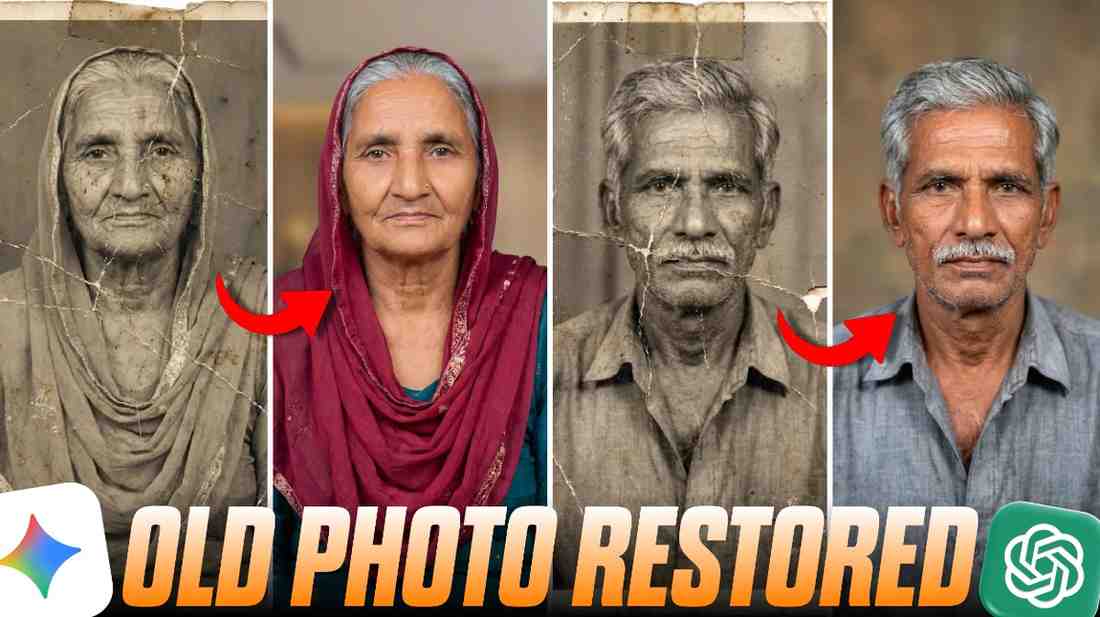
In today’s article, we will teach you how to make those old, blurry, and ruined photos look brand new with the mobile phone in your hand. Without spending any money, and without knowing any difficult editing, how you can bring back those lost memories of your family, that is what we will teach you in today’s article. So we will teach you how to make those old photos look new again, and you will be surprised to see it. It will look exactly the same as your old picture. Black and white photos will become colorful, and ruined photos will become okay.
What is Old Photo Restoration?
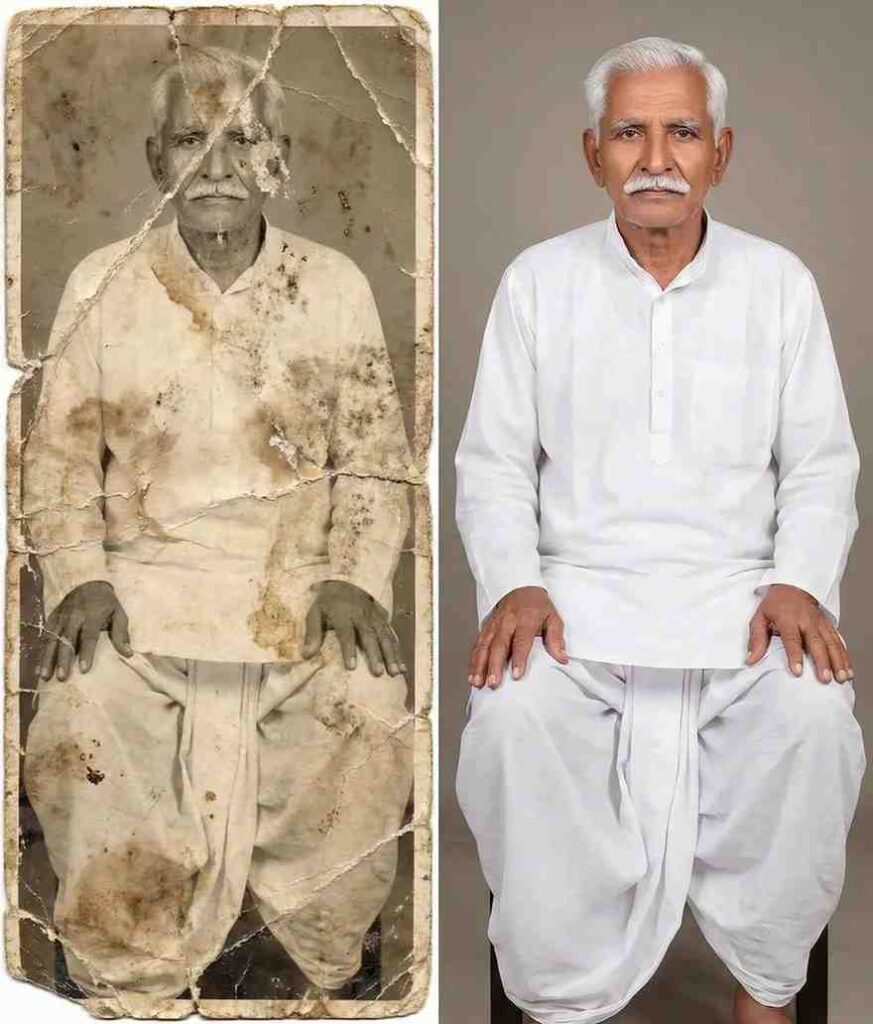
To say it in simple words, the method of making old black and white, torn, scratched, or water damaged pictures beautiful again like before by using Artificial Intelligence is called old photo restoration. The old albums that we have in our house become pale with time. Many times insects bite them, or sometimes because of moisture, the face in the picture cannot be recognized. Giving a new life to these ruined memories is the main work of this.
When I started working with a fifty year old picture of my own house, I understood how powerful this technology is. It does not only bring back the color of the picture, but it fixes the scratches or marks by itself wherever they are on the picture. You may think this is a very difficult coding matter, but it is not like that. The way we talk to normal people, if we write some words in that exact way, this AI will make the picture just like we want.
How to Restore Old Photos and Make Them Look Brand New
If you want to make that dust covered picture lying in the corner of your cupboard look like new, we have to take the help of some special writing, which are called prompt in technical language. If you want those old memories of yours to become bright and colorful like the pictures of today’s generation, then you have to give the correct direction in the correct place.
When I myself scanned a torn picture and put it inside the AI tool for the first time, I only wrote “make it new”. The result that came made me put my hand on my head. It was hard to recognize the picture, and a totally strange cartoon was made. After that I used the correct prompt and now my photo gets edited properly.
You do not have to do anything extra. The app from which you want to edit the photo, ChatGPT or Gemini, whichever app you go to, you will go there and click on the plus option. Then you will upload the photo that you want to edit. After that, if you give our secret prompt, your photo will be restored in a colorful way in HD quality.
Best Old Photo Restoration Prompt for Gemini (Copy and Paste)
Below I have made an excellent and tested old photo restoration prompt for gemini, which I used on the pictures of my own house and got the best result. You do not have to make any English sentence with difficulty, you can use the prompt below directly.
Prompt:
How to Copy and Use These AI Prompts on Your Phone or Computer
The rule to use this prompt is so easy that small children of the house will also learn it if they see it once. In our article, right below the prompt, a special copy button is given. You do not have to press and pull with your hand to select it, just a click on that copy button will save the whole text in the clipboard of your phone. After that, you have to open the Google Chrome browser or Gemini app of your mobile.
Going there, you can see that right next to the place for typing, there is a small plus or camera sign. If you touch on that, the gallery of your phone will open and from there you will select and upload that old or ruined picture of yours. After the picture is uploaded, where there is a place to write messages, if you press and hold there for a little bit, the Paste option will come. You will paste the prompt copied from our place here and click on the send button. That is all, within a few seconds, a bright new picture will be made in front of your eyes just like magic.
Why Use an Old Photo Restoration AI Prompt?
Many people may have the question in mind that why we will suddenly go towards using this old photo restoration ai prompt, when there are so many kinds of editing apps in the market. The biggest reason for this is that with normal editing apps you can erase the marks of the picture maybe, but you cannot bring back the lost details or the real shape of the face. A correct old photo restoration prompt understands the depth of your picture and reprograms every pixel perfectly.
Moreover, in the old days, if you went to a studio to fix this kind of a picture, you had to spend thousands of money, and it took day after day. Now in this modern age of technology, sitting at home, this work is being done completely free of cost in just one click. If you need more perfect results, then if you search a little by writing old photo to new photo ai prompt, you can see how easily people are making their history alive again. This is the most modern tool to keep the things connected with our feelings and memories safe forever.
Conclusion
I hope that after reading this easy guide today, all the fear of your mind is gone and you also have taken out that old album from the cupboard of your house and started editing. How did you feel to learn some new and useful things today, you will surely tell us, and you will also share this trick with your friends so that they can also keep the pictures of their memories alive.